Putting the Power in Your Hands
Putting the Power in Your Hands
Introducing Self-Service Platform Configuration
At Cortex, we understand that in the fast-paced world of sport, timing is everything. Whether you are reacting to a last-minute transfer or launching a campaign ahead of a major tournament, you need your technology to move at the speed of the game. While we pride ourselves on being a supportive partner, we also know that waiting for a manual setup can be a frustration you simply don't need when a deadline is looming.
That is why we are incredibly excited to roll out our new Settings area. This update is a significant step forward in making Cortex a truly self-serve orchestration layer. By moving configuration tools directly into your hands, we are reducing go-live lead times, and giving your internal teams the autonomy to manage the platform on your own terms.
Why This Matters for Your Team
This update is about efficiency and control. For your marketing and commercial teams, it means no longer waiting for us to make routine changes. If you need to tailor the CMS for a specific sport or a unique project requirement, you can now do so in minutes rather than days.
Furthermore, this helps ensure a more polished experience for your content editors. By allowing you to disable specific features or content blocks that your front-end isn't designed to display, you can prevent errors before they happen. This means your creators only see the tools that work for your specific site or app, leading to a smoother workflow and a more consistent experience for your fans.
What is Changing?
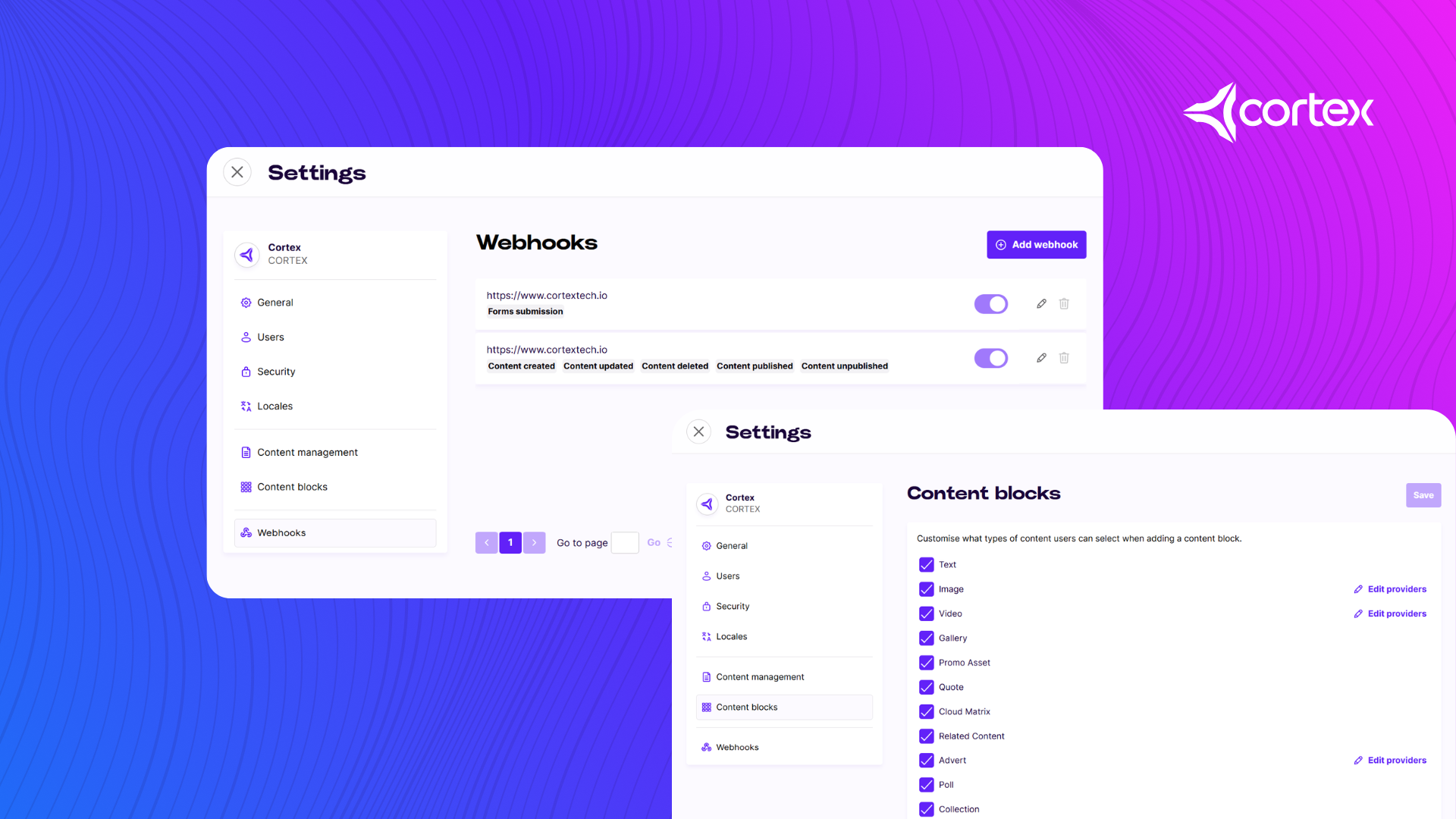
You will notice when you click the organisation icon in the bottom left corner of the platform, a new option for settings appears. Clicking this opens the Settings interface, which serves as the new central hub for platform management.
- A New Home for User Permissions: We have moved the Role Manager features into this area. You can now manage your team’s access, add or remove users, and configure Multi-Factor Authentication (MFA) all from one secure location.
- Tailored Content Management: Within the new Content Management tab, you can toggle specific CMS features on or off. For example, if your current project doesn't require "Read Time" or specific "Metadata" fields, you can hide them to keep the interface clean for your editors.
- Advanced sports and data configuration: In the general settings tab, you can now define which sports are available for your match centres, configure deep links for your mobile apps and manage linked IDs for your sports data providers.
- Global Reach and Localisation: The menu for managing languages and locales has moved here as well. Since these settings often affect everything from SSO email templates to Live Blogs, it made sense to give them a more prominent home outside of just the Content section.
- Technical Flexibility: The new Webhooks tab allows for the self-service setup of real-time notifications. You can now immediately alert third-party systems when content is created or a fan submits a form response, ensuring your entire data ecosystem stays in sync.
Custom Content Blocks
We have also listened to your feedback regarding Custom Content Blocks (CCBs). We know that some team members need to manage your content models without necessarily needing access to the daily Content feed. To reflect this, we have moved the CCBs menu out of the Content submenu and directly into the main navigation bar. This ensures that those with the right permissions can find this essential tool exactly where they expect it.
Getting Started
We want to make this transition as seamless as possible. Users who previously managed roles or custom blocks will find their permissions have carried over automatically. For everything else, a new "Platform Setup" role group is available to grant your team the necessary access.
By giving you the tools to orchestrate your own fan data environment, we are helping your organisation move from insight to action faster than ever. For a full technical breakdown of how to get the most out of these new features, you can find our detailed guide in the Cortex Developer Portal.